العربية
Arabic ⇄ English

Arabic to English, inside every chat.

AI Keyboard is a keyboard for iPhone and Android. Write in Arabic and it goes out in natural English — and any English message comes back to you in Arabic, without leaving the conversation.

Get the app — App StoreGet the app — Google PlayFree to start — no account
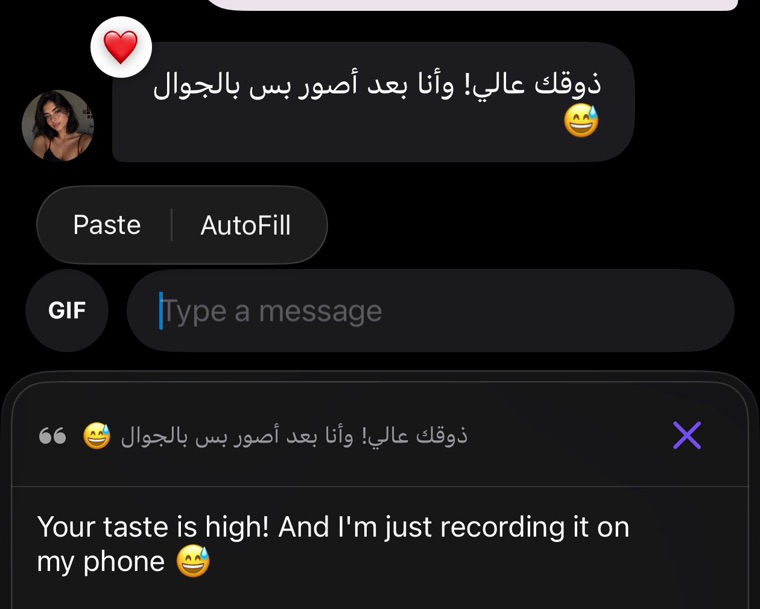
An Arabic message translated into English by the AI Keyboard keyboard, shown inside the chat
Copy an Arabic message — the translation appears above the keyboard. Nothing is pasted into the chat.
What it does

One keyboard instead of three apps.

No tab-switching, no clipboard juggling, no losing the thread of the conversation.

⌨️

Type in Arabic, send in English

Write the message the way you'd say it. Tap ✦ and what you typed is replaced in place by natural English — tone, slang and punctuation kept intact.

💬

Read Arabic without leaving the chat

Copy any incoming message and the keyboard shows it in your language above the keys. Nothing is inserted into the input field, nothing is sent.

Replies written for you

Screenshot the conversation and get three replies that fit what was actually said — each one with its translation, ready to send.

Both directions

Arabic to English, English to Arabic.

The same key works whichever way the conversation is going — the source language is detected on its own.

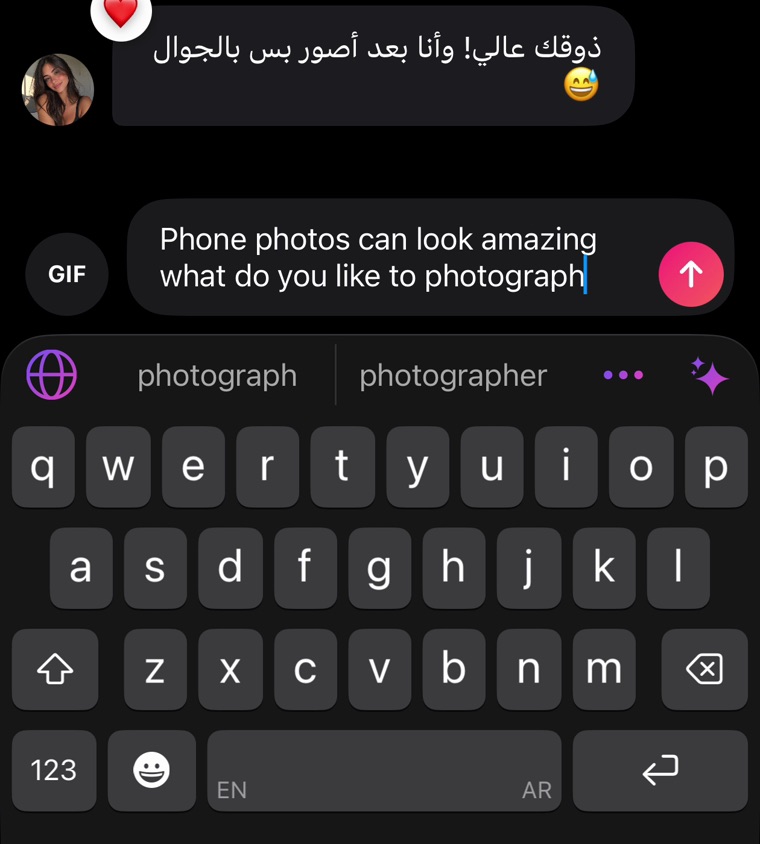
Typing in English on the AI Keyboard keyboard in an Arabic conversation, with the EN and AR switch on the space bar
Type in either language and send in the other — the pair is switched right on the space bar.
An Arabic message translated into English by the AI Keyboard keyboard, shown inside the chat
Copy an Arabic message — the translation appears above the keyboard. Nothing is pasted into the chat.

Which Arabic it writes

Everyday spoken Arabic, not textbook Modern Standard: the kind of Arabic people actually type in chats. Formal English comes out formal, casual English stays casual — the register of the message is carried across rather than flattened.

Where it gets used

The conversations this is actually for.

Not travel phrases — the messages you send every day and can't afford to get wrong.

💼

Work and clients

Reply to an English email or a client on WhatsApp without drafting it twice. What you write in Arabic goes out in English that reads like you meant it — not like a translator produced it.

👨‍👩‍👧

Family and friends abroad

Cousins who grew up speaking English, in-laws who don't speak Arabic, group chats where half the thread is in each language — everyone writes in their own and reads in their own.

💗

Dating and new people

First messages are where wording matters most. The tone survives the translation, so a joke stays a joke instead of turning into a formal sentence.

Setup

Three steps, about a minute.

You don't need Apple's Arabic keyboard installed — the Arabic layout ships with the app.

Add the keyboard

On iPhone: Settings → General → Keyboard → Keyboards → Add New Keyboard → AI Keyboard, then turn on Full Access. On Android, enable AI Keyboard in the system keyboard settings.

Set Arabic and English as your pair

Long-press 🌐 in any app to pick the language you type in and the language it comes out in. Swap the two around whenever the conversation turns.

Tap ✦ to translate

Your text is read only at the moment you ask for it. The translation replaces what you typed — check it, then hit send.

FAQ

Questions people ask first.

Does it work inside WhatsApp, Instagram and iMessage?

Yes. AI Keyboard is a system keyboard, so it works in every app that has a text field — messengers, social apps, email, dating apps, browsers, notes.

Do I need to install a separate Arabic keyboard?

No. The Arabic layout comes with the app and sits next to your English one — you switch between them right on the space bar, without going into system settings.

Does it translate English to Arabic as well?

Yes, both directions. Long-press 🌐 to swap the pair around, or copy an incoming message to read it in your own language.

Is it free?

Yes, to start. Translation on your device costs nothing, and connecting your own API key from Gemini, Groq, Cerebras, OpenRouter, Z.AI or Mistral is free too. AI Keyboard Pro is optional and only removes the setup step.

Does it work without internet?

The on-device engine runs locally and works offline. For Arabic the cloud engines are noticeably more natural, so if the wording matters — a work message, a first conversation — use your own key or Pro.

Is what I type sent anywhere?

Only when you tap the translate key, and only that message. There is no logging of your typing, no account and no sign-up. With the on-device engine nothing leaves the phone at all.

Type in Arabic.
Be read in English.

Get the app — App StoreGet the app — Google Play